
Match the mod to its documented setup
| Mod or tool | Documented requirement | Boundary |
|---|---|---|
| SledMenu 0.1.0 | Original May README: Steam, Unity 6 IL2CPP, MelonLoader 0.6.x with 0.6.6 preferred. | An early author-tested setup; not proof of September/October compatibility. |
| Sledding Mouse Stutter Fix 1.0.0 | Original August package/README: MelonLoader 0.7.3+; DLL in Mods. | Targets freezes during high-polling-rate mouse movement. |
| Gale or r2modman | Mouse-fix author offers these managers and declares MelonLoader as a dependency. | Manager availability does not guarantee every package supports the game update. |
| Other catalogue packages | Read their own dependency and loader declarations. | Do not put a BepInEx plugin into MelonLoader’s Mods folder merely because both are listed for the game. |
On a small screen, scroll the table sideways to see every column.
The October 12 community API contains 25 packages, including tools and mods. This is an availability snapshot, not a tested list of 25 compatible gameplay modifications. In particular, an old achievement patch may overlap an achievement the developer fixed in September.
The SledMenu author tells users to target SleddingGame.exe, rather than EOSBootstrapper.exe. Its requirements concern a Steam install; they do not establish an equivalent injection procedure for Xbox PC, console or cloud.
Sources: SledMenu author README · NiceMitch: Sledding Mouse Stutter Fix · Sledding Game community packages · September 21 official update
Use the mouse-fix author’s concrete example
For multi-second freezes that occur specifically while moving a high-polling-rate mouse, NiceMitch documents this targeted setup. Treat the author’s performance results as their measurement, not a promised improvement on every PC. Check the FPS guide when the symptom is different.
Keep a progress backup and close the game
Make a save backup and quit the game. Preserve the current loader/mod configuration before replacing an existing setup.
Install the declared loader
The mouse-fix README requires MelonLoader 0.7.3+. Follow MelonLoader’s own requirements and installer documentation; do not substitute the older version preferred by the separate SledMenu package.
Generate the loader folders
The author instructs users to launch once so the loader generates folders and IL2CPP assemblies. Then close the game before copying the mod.
Add the author’s DLL
Copy SleddingMouseFix.dll to the game’s Mods folder and launch again. The author also supports Gale/r2modman installation with the declared dependency.
Check only the targeted symptom
Compare mouse movement in the same menu or scene. The author documents Enabled and LogStats in UserData/MelonPreferences.cfg; setting Enabled to false disables this fix without removing the package.
To return a manual MelonLoader setup to ordinary launch, close the game. The loader’s uninstall instructions remove its injected version.dll and its MelonLoader folder; Mods, Plugins and UserData are additional mod directories, not the game’s LocalLow progress backup. Preserve those settings separately if you want a reversible reinstallation.
Sources: NiceMitch: Sledding Mouse Stutter Fix · MelonLoader: installation and removal · SledMenu author README
Use the built-in language before installing a translation
The official Steam listing includes Japanese interface support. Raison Detre’s original screenshots show Settings → MISC → LANGUAGE and the Japanese choice. A separate translation loader is therefore not required just to select Japanese.
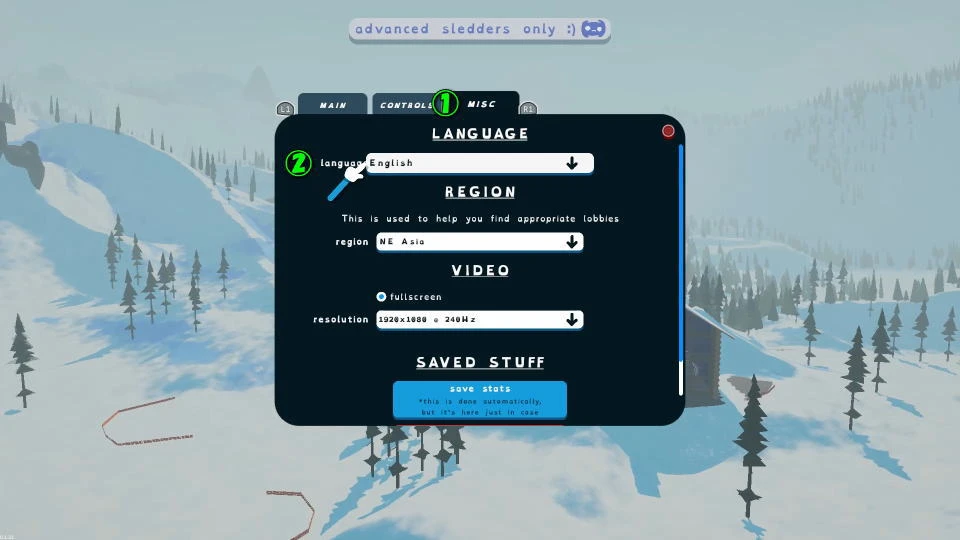
A third-party translation package is a separate mod. Use that package’s specific loader, version and installation instructions only if they name Sledding Game and the applicable store build. No verified game-specific automatic-translation package or universal translation dependency is established by the inspected sources.
After an update, confirm normal unmodified launch before reintroducing mods individually. Preserve the last working version information with your backup so a later rollback is understandable.
Sources: Volx: photographed input settings · Official Steam listing · MelonLoader: installation and removal